Product six · live · free
Autopilot. Every filing deadline, for every company you own.
Running companies in several countries means keeping track of different filing rules, tax dates and registers. Add your companies once. Autopilot fills in their details from the official registers, works out every deadline from each country's rules, reminds you in good time, and checks each company at its register every night. When you would rather someone else handled a filing, Grant & Graham quotes a fixed fee before any work starts.
Free · works in the browser on laptop, tablet and phone · installs as an app · the demo is a sample group of six companies in five countries, and nothing you do in it is saved
One question answered before you scroll: is anything overdue?
The overview opens on four numbers: how many companies you track, what is due in the next 30 days, what needs a decision, and what is overdue. Below them, the next deadlines across every company, new letters from the authorities, and anything Autopilot has flagged.


The compliance calendar a group of companies needs, kept for you.
Autopilot does the remembering. It does not file anything on your behalf by itself; when you want a filing taken off your hands, you ask, and a person at Grant & Graham or one of its vetted local partners picks it up.
Your compliance calendar
From the rules of each country: annual accounts, tax returns, confirmation statements, VAT, payroll returns and more, counted from each company's financial year end and incorporation date.
From the official registers
Search Companies House, the Estonian e-Business Register, the Brønnøysund Register and others by name or number. Name, number, legal form, address, incorporation date, year end and officers come across by themselves.
The registers, every night
Each company is compared with the night before: status, name, registered address, officers, and filings shown as overdue or received. A change appears at the top of the overview.
Risks before they cost money
A missing contact person in Estonia. Directors who still need to verify their identity with Companies House. A registration number not on file. Each check says what it means and what to do.
By email, on your phone, in your calendar
30 days, 7 days and 1 day before, and the day after a missed date, or whenever you choose. Subscribe once and every deadline follows into Apple, Google or Outlook calendars.
Notices and documents
A letter from a tax office becomes a task with its own deadline. Filed accounts, confirmations and letters are kept with the company, encrypted before they are stored.
Find it in the register. Check it. Add it.
The quickest way in is the company's own official register, so nothing is typed by hand that a register already knows.
- Choose Add a company and pick the country under Find it in the company register.
- Type the company name or its registration number and search.
- Choose your company from the results. Autopilot fills in the name, number, legal form, address, incorporation date, financial year end and officers.
- Check the details, add what the register does not hold, such as VAT returns, employees or whether the company is dormant, and choose Add company.
No register connection for the country? Type the details in yourself; Autopilot links to that country's official register so you can look them up, and searches the global LEI register for larger companies. Every detail can be changed later with Edit details.


Everything about one company, on one page.
The key facts, the next twelve months as a bar per month so busy months show coming, every filing with its date, authority and status, the checks, the official register record with when it was last checked, and the documents.


Where a check needs work done, it offers Ask Grant & Graham to handle it. The request goes to your consultant, who replies with a fixed fee before anything starts.
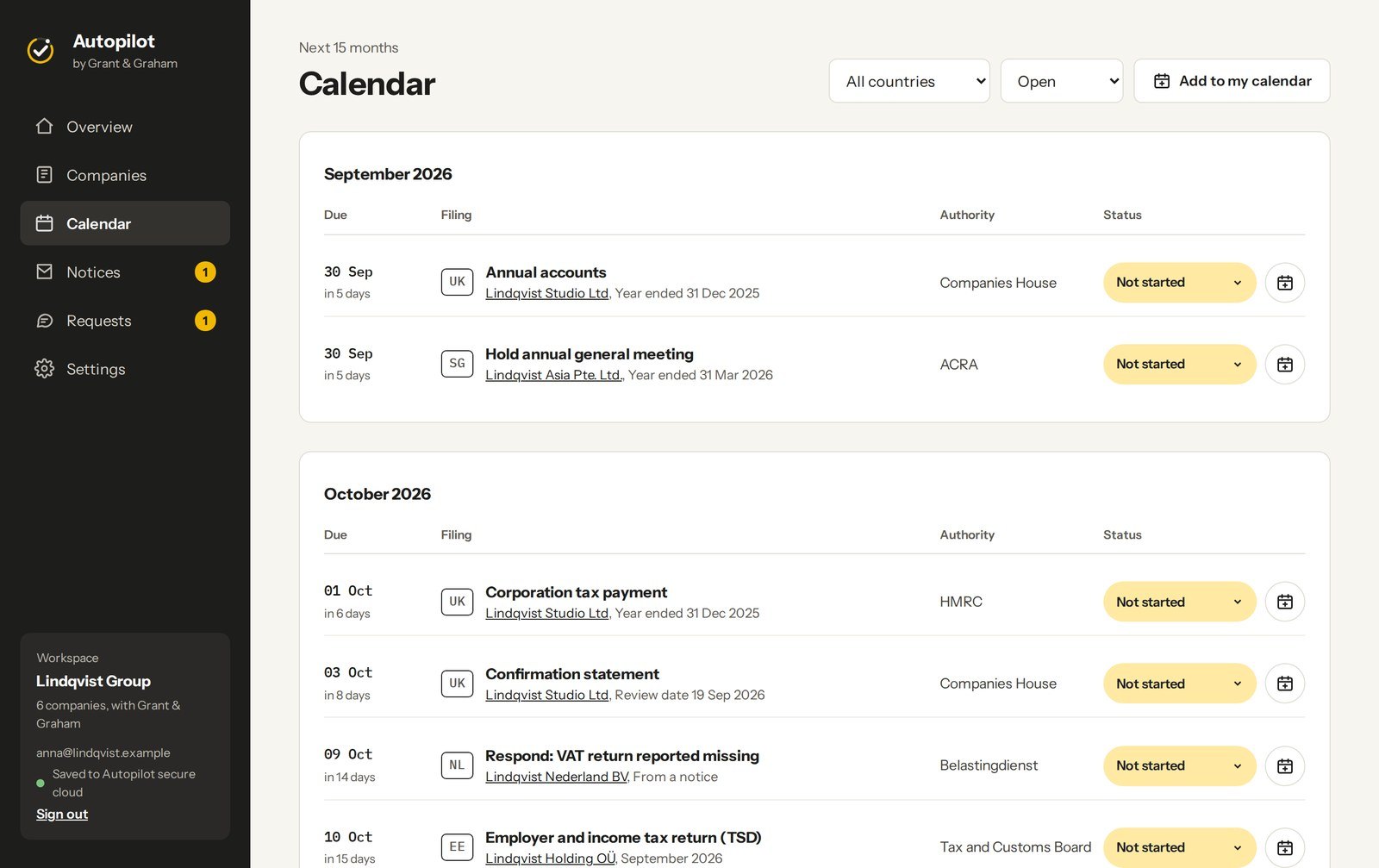
Fifteen months ahead, across every company.
The Calendar lists every deadline for the next 15 months, filtered by country or by status. Each one can go into your own calendar with reminders, or you subscribe once and new, changed and filed deadlines follow by themselves, along with confirmed meetings with Grant & Graham.
Before each deadline
By default 30 days, 7 days and 1 day before, and the day after a missed one. Choose other moments, or none, in Settings. Each email lists what is due, with calendar links.
Apple, Google, Outlook, Microsoft 365
Add one deadline with a calendar file or a link, or create your private calendar link and subscribe to the lot. If the link is ever shared by mistake, stop it and make a new one.
A letter becomes a task
Add a letter from a tax office or register with its deadline, a short summary and a photo. Then ask Grant & Graham to resolve it, send it to your accountant, or mark it handled.

Ask for help without losing track of it.
Book a call, ask for help with a filing, or ask about anything else, from a company page, a check, a notice or the Requests page. Every request is followed through the same six steps, and a request commits you to nothing: work starts only after you accept a fixed fee.
One request · six steps · nothing starts before a fixed fee is accepted


- Four kinds of call: Introduction, Follow-up, Company Formation and Project Brief
- Requests go to your own consultant, or to the Grant & Graham UK team
- Autopilot never asks for or stores card or bank details
The same records, on every device you sign in on.
Autopilot works in any modern browser and changes its layout to the screen. Installed, it opens full screen from its own icon, with notifications for deadlines, register changes and replies from Grant & Graham. Your records sync between devices; nothing is kept on the device itself.


Add to Home Screen
Open soundchecksoftware.eu/autopilot in Safari, tap Share, then Add to Home Screen. Apple only allows notifications for installed web apps, so install first, then turn them on.
Install the app
Open the link in Chrome and choose Install the app in the menu or in Settings, then confirm.
Install from Chrome or Edge
Choose Install the app for its own window and a place in the Dock or taskbar. Or simply keep it as a tab.
Sixteen countries of filing rules. Ten registers connected.
For these countries Autopilot calculates the deadlines by itself. For any other country, add the deadlines yourself or ask Grant & Graham to set them up; the company is still tracked, reminded and kept with its documents.
| Country | Main deadlines tracked |
|---|---|
| United Kingdom | Confirmation statement, annual accounts, corporation tax payment and return (CT600), VAT. Warns about director identity verification. |
| Ireland | Annual return (B1), corporation tax return (CT1), preliminary tax, VAT (VAT3). |
| Estonia | Annual report, VAT (KMD), employer return (TSD). Warns about a missing contact person. |
| Netherlands | Annual accounts filing, corporate income tax return, VAT, payroll tax. |
| Germany | Publishing annual accounts, annual tax returns (with or without a tax adviser), VAT pre returns. |
| Austria | Annual accounts with the Firmenbuch, corporate tax return, VAT pre returns. |
| Cyprus | Corporate tax return (TD4), provisional tax, annual return (HE32), VAT. |
| Jersey | Annual return, company tax return including economic substance. |
| United Arab Emirates | Corporate tax return, VAT, trade licence renewal. |
| United States | Federal return (Form 1120), Form 5472 for foreign owned LLCs, registered agent renewal, and state filings for Delaware, California, Florida, Nevada, New York, Texas and Wyoming. |
| Singapore | Estimated chargeable income, AGM, annual return, corporate tax return (Form C or C-S), GST. |
| Norway | Tax return, annual accounts, VAT. |
| France | Corporate tax return, approval and filing of annual accounts. |
| Finland | Corporate tax return, financial statements, VAT. |
| Czech Republic | Corporate income tax return, financial statements, VAT. |
| Poland | Corporate income tax return (CIT-8), approval and filing of financial statements, VAT (JPK_V7). |
| Country | Register | What Autopilot fills in |
|---|---|---|
| United Kingdom | Companies House | Full record, officers, next due dates for accounts and confirmation statement |
| Estonia | e-Business Register | Full record and board members |
| Netherlands | KvK open data | Status, start date and legal form, searched by KvK number |
| Norway | Brønnøysund Register Centre | Full record and officers |
| Singapore | ACRA | Company record |
| France | Recherche d'entreprises | Company record and officers |
| Finland | Finnish Trade Register | Company record |
| Czech Republic | ARES | Company record |
| Poland | KRS | Company record, searched by KRS number |
| United States | New York, Colorado, Connecticut, Oregon and Pennsylvania registers, and SEC EDGAR | Company record; officers for Connecticut and Pennsylvania |
| Any other country | Global LEI register | Record for companies with a Legal Entity Identifier |
Deadlines follow the standard statutory rules of each country, checked against official sources in September 2026. They are a guide: some dates can be extended, and some depend on facts Autopilot does not know, such as a changed accounting period. Confirm important dates with the authority, your accountant or Grant & Graham.
Your records are yours. We cannot read them.
Autopilot has its own sign in and its own storage, on our own servers in Europe, with no outside backend in between. Grant & Graham can see your account details, the requests you choose to send, and the security log, so it can support you. It cannot see your company records or documents.
Password, then an email code
Every sign in asks for a 6 digit code sent to your email, so a password alone is not enough. After 8 wrong passwords the account pauses for 15 minutes; after 30 minutes idle it signs out.
Our cloud, or your own
Records, documents, reminders and register history are encrypted before they are stored. Or keep them on your own storage with a WebDAV link: Nextcloud, ownCloud, Synology, pCloud, Koofr or a Hetzner Storage Box.
Colleagues and your accountant
Invite a co director or accountant with Can view or Can view and edit. They sign in with their own account and code, so nobody shares a password. Remove them at any time.
Export it, or delete it
Download a backup of all your records at any time and import it again later. Delete the account and the account and records are removed for good.
See who signed in, and where
Recent sign in activity shows when and from where the account was used. Sign out on all devices at once from Settings.
No card or bank details, ever
Payment for Grant & Graham work runs through its invoice and payment link. Autopilot only records that it was paid.
What people ask first.
What does Autopilot cost?
Autopilot is currently free of charge. Work you ask Grant & Graham to do is quoted separately, always as a fixed fee before anything starts.
My country is not in the list. Can I still use it?
Yes. Choose Any other country and type the details in. Autopilot searches the global LEI register for larger companies and links to the official register of your country. Add the deadlines yourself with Add a deadline, or ask Grant & Graham to set them up.
How accurate are the deadlines?
They follow the standard statutory rules of each country and are a guide. If a date does not fit your company, first check the financial year end, incorporation date and VAT settings, as these decide most dates. Then mark the standard one as filed and add the correct one.
Does sending a request commit me to anything?
No. A request only asks for help or a quote. Work starts only after you accept a fixed fee quote, which is then carried out under Grant & Graham's standard engagement terms.
Can I track a dormant company?
Yes. Tick Company is dormant in the company details, and filings that only apply to trading companies, such as VAT returns and some tax payments, are left out.
Can my accountant see everything?
They see your companies, deadlines, checks, register changes and documents. They do not see your requests to Grant & Graham, your reminder settings or your account.
Can I use it on several devices?
Yes. Sign in on each device with the same account and your records sync. If something is changed on two devices at the same time, Autopilot says so and loads the latest version.
More in the Autopilot user guide, 29 pages, PDF.
Add your companies once. Autopilot keeps the dates.
Create an account in a minute, or look around the sample group first. For questions about your filings, Grant & Graham is one click away inside the app.
Autopilot by Grant & Graham is built and run by Soundcheck Software. Screenshots show a fictional sample group.